WORKFLOW GUIDES

Practical Workflows

Task-oriented guides that explain how to get real work done with Aegis applications. Each workflow combines the underlying approach and technology with step-by-step instructions, diagrams, screenshots and practical tips.

Focused Walkthroughs & Tutorials

Alongside our end-to-end multi-device workflows, these focused tutorials cover individual stages of setting up, importing, curating and tuning Aegis Photo Voyager. More cross-application workflows will be added here over time.

WORKFLOW

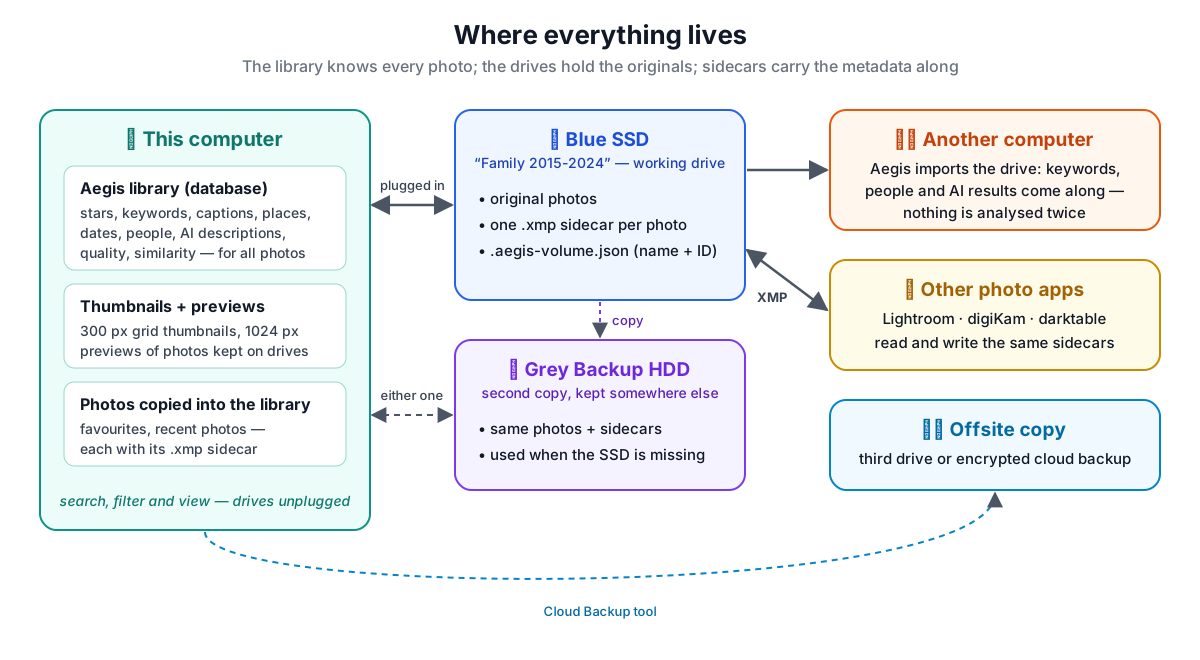
Managing a Photo Library Across Drives and Computers

Import vs. keep on external drives, deep import, 3-2-1 copies, XMP sidecars and three-way metadata sync, step by step.

Read Workflow
MIGRATION

Cloud to Local Migration

Strategies for moving your photo history from Google Photos (Takeout) and Apple iCloud onto your own drives for Aegis Photo Voyager.

Read Migration Guide
TUTORIAL

Getting Started with Photo Voyager

First-hour walkthrough covering library creation, local AI provider setup, initial photo import and exploring your catalog.

Read Tutorial
TUTORIAL

Importing Workflow

Incremental filtering, detached background workers, status monitoring, and launching the 7-stage local AI pipeline.

Read Tutorial
TUTORIAL

Collections & Curation

Virtual collections, chronological event mapping with Trip Builder, technical quality sorting and sharing workflows.

Read Tutorial
TUTORIAL

Configuration & Tuning

System configuration, duplicate thresholds, offline CPU/GPU AI engines, custom prompts and performance tuning.

Read Tutorial